Online dating
Know who you're meeting before you meet.
Profiles, photos and verification badges only tell you so much. Send a Trust Request before you meet: Photos Verified confirms the person is really who their photos show, and ID Verified is there if you want to establish who someone is. Verify each other for the strongest picture, or just ask them to start.
Why people ask
What people report about online dating
Three independently published findings. Figures are quoted as reported by each source.
52%
of U.S. online-dating users surveyed said they had encountered someone they thought was trying to scam them.
Pew Research Center, 202366%
of U.S. women under 50 who had used online dating experienced at least one of four unwanted behaviours measured by Pew.
Pew Research Center, 202334%
of Australian dating-app/site users in a study of 9,987 people reported in-person sexual harassment, aggression or violence involving someone they met through online dating.
Australian Institute of Criminology, 2022The gap
A verified profile isn't the same as verifying the person you're meeting.
Dating platforms run their own safety and verification systems, and those systems vary by platform and by market. They're built to help the platform keep its own community in good shape.
Tinder states that its Photo Verification does not guarantee the identity or safety of a particular user, and that its optional ID + Photo Verification does not guarantee the validity of the ID or the safety of a particular user.
Platform verification and person-to-person verification simply solve different problems. A Trust Request is the second kind: a private check between the two people who are about to meet.
How it works
How NoStrangers works for online dating
Send the request, they verify, you see the result before anyone turns up anywhere.
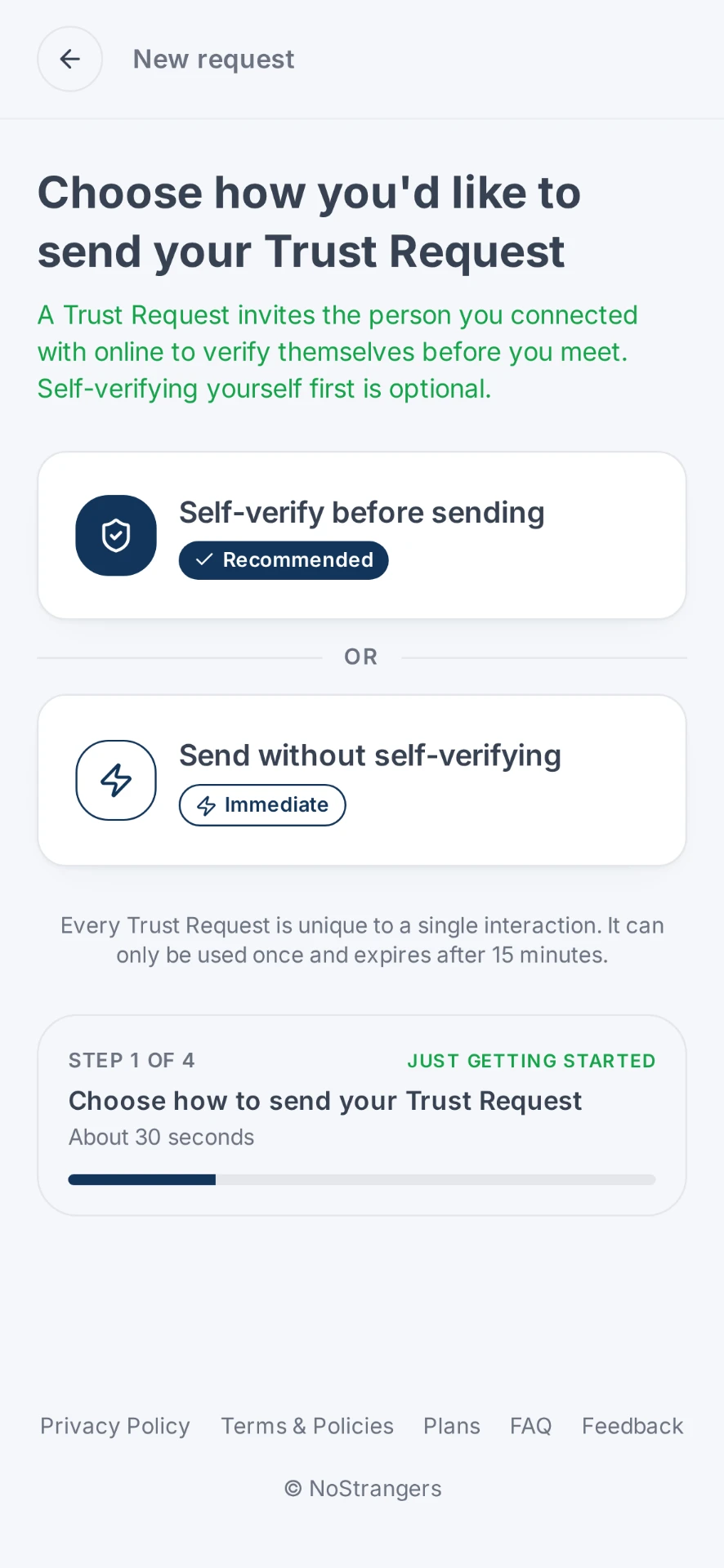
Send a Trust Request
Generate a unique Trust Request and send it to the person you're considering meeting.
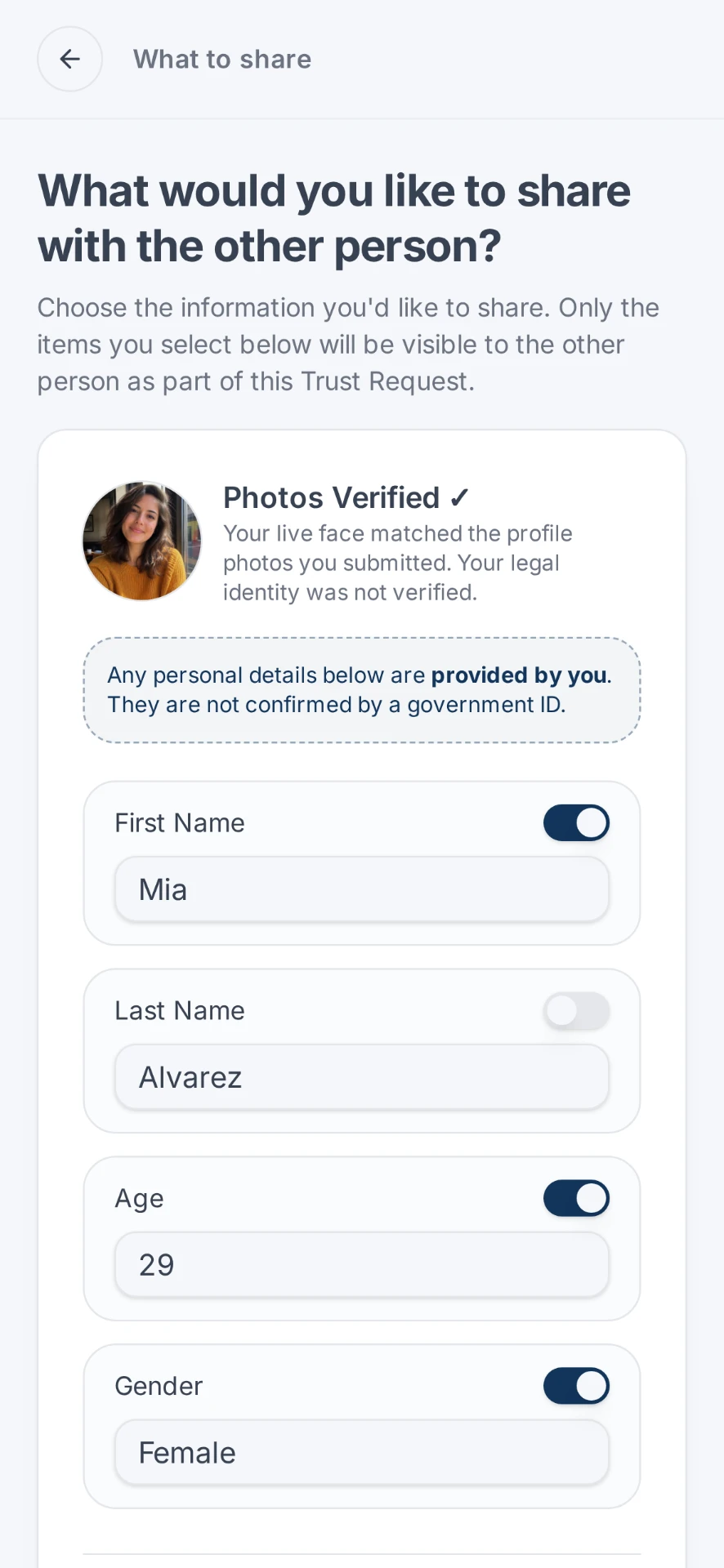
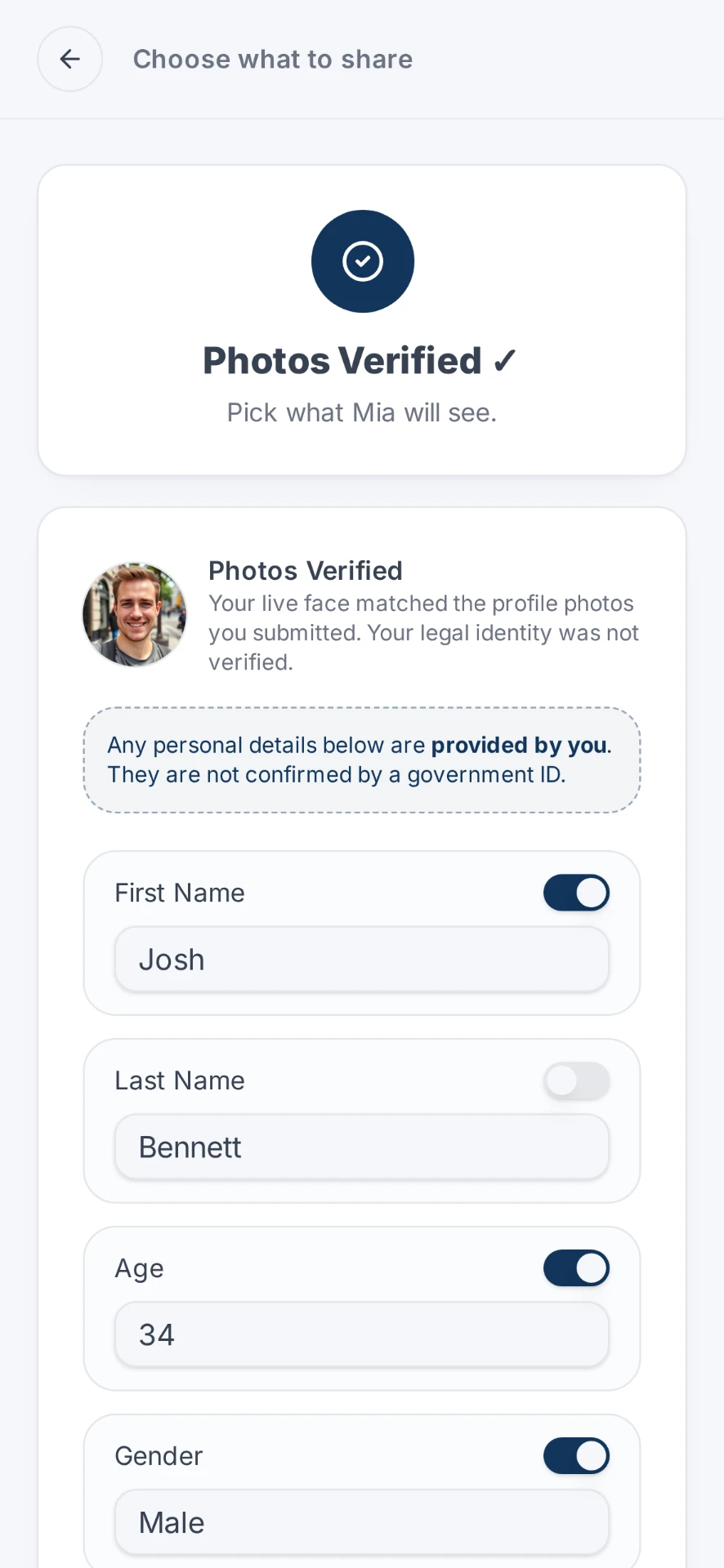
They verify
The person you sent it to completes their verification and chooses what to share back. Sending your own alongside theirs is what builds trust fastest, but it's their move that matters here. Want it to feel more mutual? Confirm yourself first and choose what you're comfortable sharing. Then ask them to do the same. It's optional.
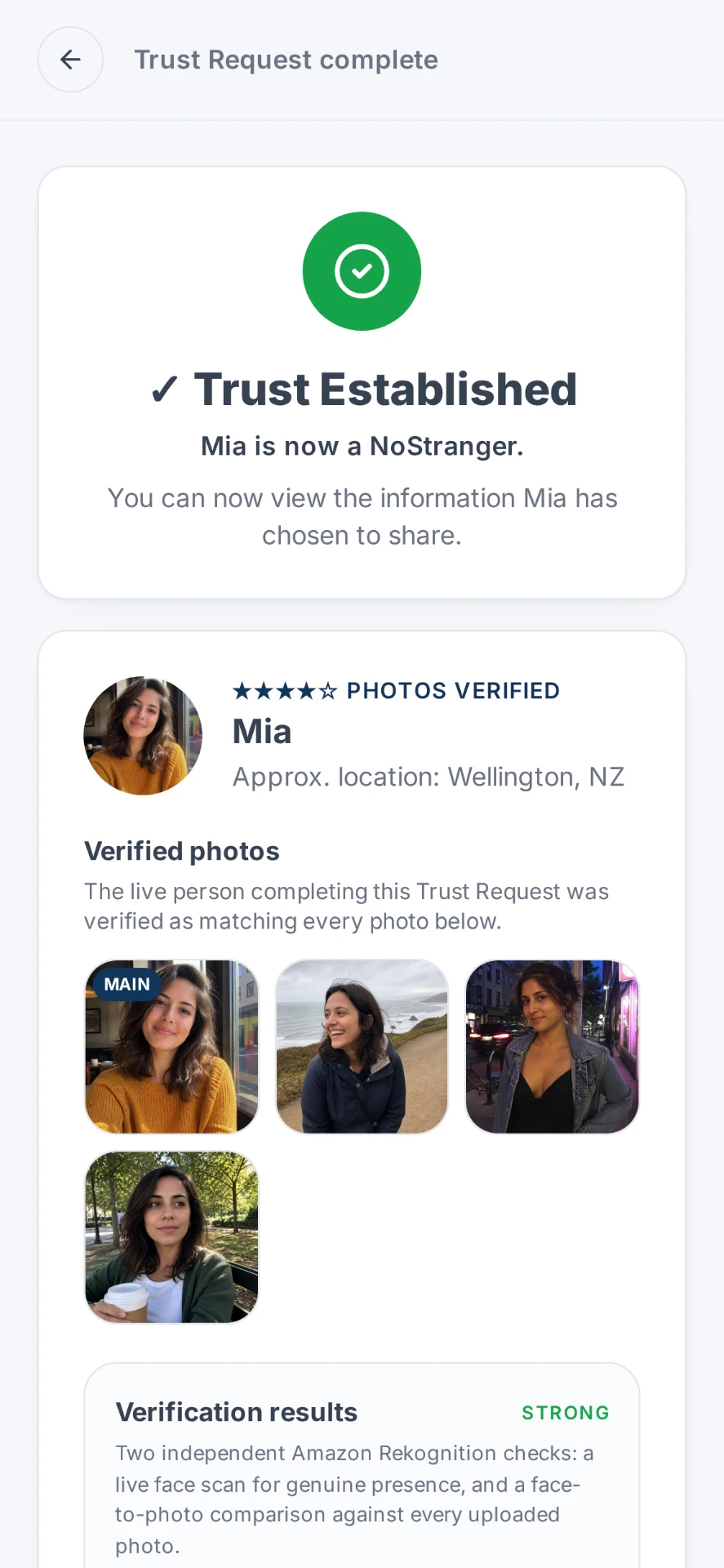
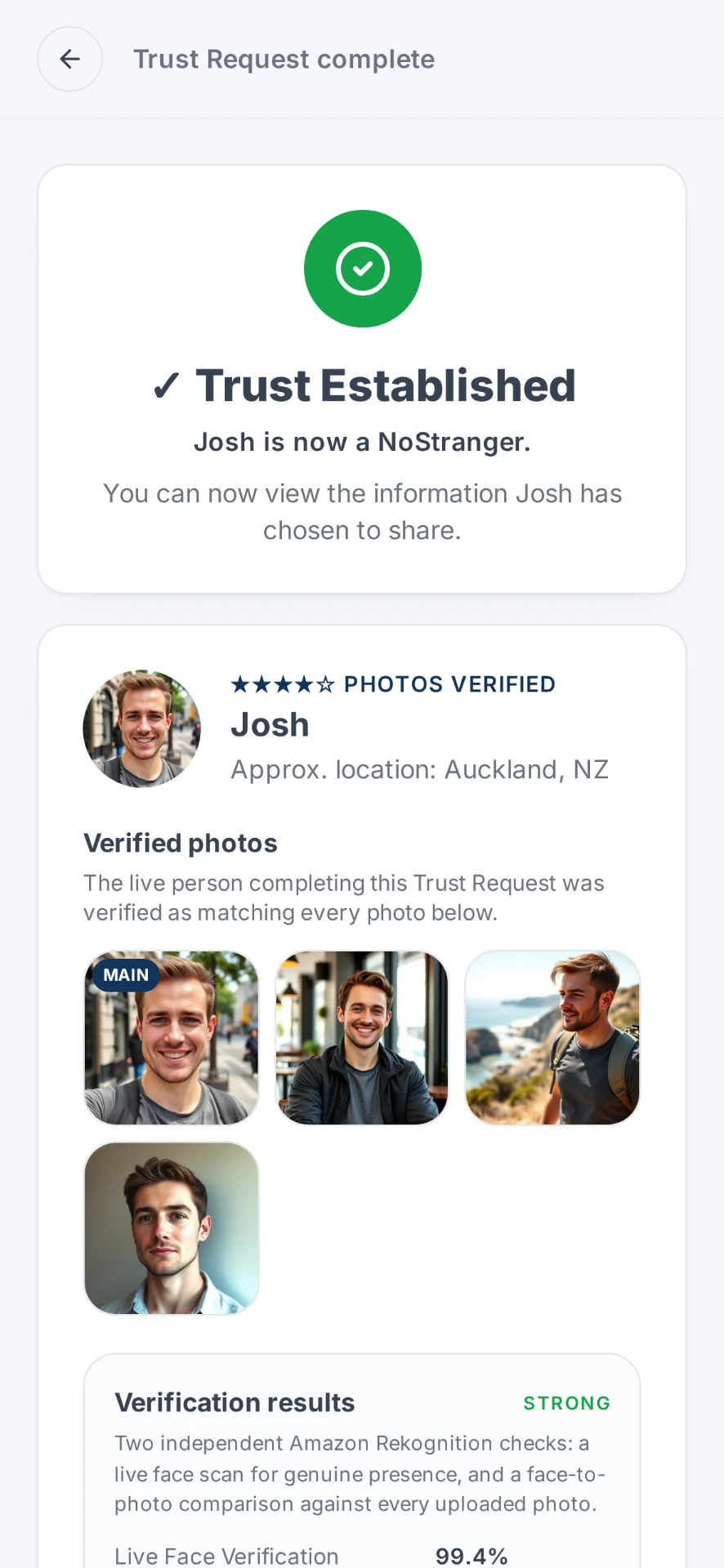
Trust established
See the verification result before deciding whether you want to meet.
Privacy
Verify more. Expose less.
Only the match is shared. Your private information isn't. They don't see it. Neither do we.
A Trust Request is designed so two people can establish confidence before meeting without simply exchanging identity documents with one another. You decide what goes into the request, the other person decides what goes into theirs, and each of you sees only what the other chose to share.
More detail in our Privacy Policy. Before a first date, see the signs of catfishing, or verify someone from a dating app.
When to use it
Built for the moment before you meet
Dating apps
You've matched, you've been talking, and now you're considering meeting in person.
Blank or limited profiles
Someone has good reasons for keeping their public profile private but still wants to establish trust privately with you.
Moving off-platform
You've moved from the dating app to messaging and want an independent way to verify one another.
Photos you're unsure about
You want confidence that the live person completing the Trust Request is Photos Verified: they match the photos they've chosen to share.
Be clear
What a Trust Request does and doesn't do
Verification gives you better information. It does not make a stranger safe.
It can help you
- Establish that a live person completed the verification process.
- Confirm, with Photos Verified, that the person matches the photos they're presenting.
- Establish, with ID Verified, who someone is using government-issued ID.
- Work one-way, so you can ask someone to verify without needing to verify yourself first.
- Make a more informed decision before meeting.
It doesn't
- Guarantee that someone is safe.
- Predict someone's behaviour or intentions.
- Replace your own judgement or normal meeting-safety precautions.
FAQ
Online dating verification questions
What is dating verification?
Dating verification means checking that the person behind a profile is really the person in the photos before you meet them. With NoStrangers, both people can complete Photos Verified: a live face check matched against the photos they're presenting. If you want stronger assurance of who someone is, either person can instead go with ID Verified, which adds a government-issued ID check plus the live face check. Either way, each person sees only what the other chose to share.
How can I verify someone before meeting them from a dating app?
Send them a Trust Request. You generate a unique code, they use it to complete their own verification, and you both see the result before deciding whether to meet. It usually takes about 90 seconds.
Does NoStrangers require the other person to download an app?
No. NoStrangers runs in the browser, so the other person opens your unique code and completes their side without installing anything.
Will the other person see my ID?
No. You choose what to share, and the other person sees only that. A Trust Request is designed so two people can establish confidence without handing identity documents to each other.
Can I use NoStrangers with Tinder, Grindr, Hinge, Bumble or other dating apps?
Yes. NoStrangers works independently of any dating platform and is not partnered with or integrated into any of them. You can send a Trust Request alongside any app or messaging service you're already using.
How can I tell if someone on Tinder, Hinge, Bumble or Grindr is real?
Check that their photos, bio and messages fit together, and suggest a quick video call. If you want more certainty before meeting, send a Trust Request so they can complete Photos Verified. It works the same whichever app you matched on.
How do I check if a dating profile is real?
Reverse image search the photos, watch for details that change, and notice any reluctance to talk live. Our guide on how to tell if you're being catfished covers the warning signs in more depth. A profile can only tell you so much, which is why Photos Verified checks the live person against the photos.
Does a Trust Request guarantee someone is safe?
No. A Photos Verified result tells you a live person matches the photos they're presenting, and an ID Verified result tells you they've established who they are with government ID. Both give you better information to decide with, but neither predicts behaviour or intentions, and neither replaces normal meeting-safety precautions.
How long does a Trust Request take?
Most people finish in about 90 seconds, once the other person opens the request.
Where else it works
Before you meet, send a Trust Request.
About 90 seconds for a little more confidence about who's on the other side.